
Blog ·
Both companies use 10.0.0.0/8: what happens to IP space in an acquisition
Two networks, one deal, and nobody knows where they overlap.
M&AIPAMNetworkingTerraformMSP
It's Monday morning, and the M&A project lands on your desk. You know there are going to be IP overlaps, and you know it won't be long before you're asked to integrate your systems with the newly acquired company.
Which side is going to renumber? Nobody has asked yet, but you know the question is coming. Each network was built in isolation from 10.0.0.0/8, and each was fine on its own. Now a deal worth more than either network relies on the two of them talking to each other, and we all know how this story goes.
Nobody knows where they collide yet. That is the problem, and it does not fix itself. To make an effective decision about what may or may not need re-addressing, you first need to understand the scale of it. That is where nxip can help.
When it starts to become an issue
These are the shapes it takes, roughly in the order they tend to arrive.
You want to merge WAN networks, so your new M&A partner can reach critical security and domain resources. Somebody tries to bring up a site-to-site VPN or a cloud peering between the two estates and the control plane simply refuses it, because the two ends claim overlapping address space. This is the good outcome. It fails loudly, before anything is carrying traffic, and it names the collision for you.
The route that quietly wins. Where the overlap is partial rather than identical, or where NAT is already in the path, nothing refuses anything. Traffic for one company's subnet is delivered to the other company's subnet, or to nowhere. Longest-prefix match does exactly what it is supposed to do and the result is a blackhole that looks like an application bug. This one costs the most, and causes distrust between what was previously two separate IT teams.
The range handed out twice. Someone on the acquiring side allocates a new subnet from what looks like free space. It is free in the estate they have always managed. It is in production in the estate they have just inherited. Nothing catches it until the two networks are joined, which may be months after the allocation, at which point the range has DNS records, firewall rules and a third party's allowlist pointing at it.
The discovery that arrives three sprints late. All of the above are survivable when you know about them during due diligence and merely expensive when you find them during integration. The usual reason they arrive late is that the question was never asked in a form anyone could answer. "Send us your IP addressing" produces a Visio diagram from 2021 and a spreadsheet somebody stopped updating when they left.
None of this is fixed by buying a tool. Renumbering a production network is unavoidable. What a tool can do is show you the overlaps explicitly, so the decision is made from a list rather than from memory. That is the visibility gap, and it is the one part of this you can close quickly.
Keeping two estates apart on purpose
Here is what you can quickly set up today, because the first month after a deal is probably not the best time to work on renumbering all your prod systems.
Two organizations, without having to merge and complicate the existing space.
Keep the acquired estate as its own organization. In nxip an organization is the tenant boundary, not a label: every pool, subnet and address carries its organization id, and every query filters on it. Two organizations can both hold 10.0.0.0/8 and neither one's allocation checks ever look at the other's space. An overlapping address is refused within an organization, by design. Organizations exist to be able to manage separate spaces, that could potentially overlap.
The other half of that is what happens when something reaches across. A request naming a record in the other organization gets 404, with the same body it would get for an id that never existed at all. Not 403, which would confirm the record is real. There is no "this organization and its children" query anywhere in the codebase to widen by accident.
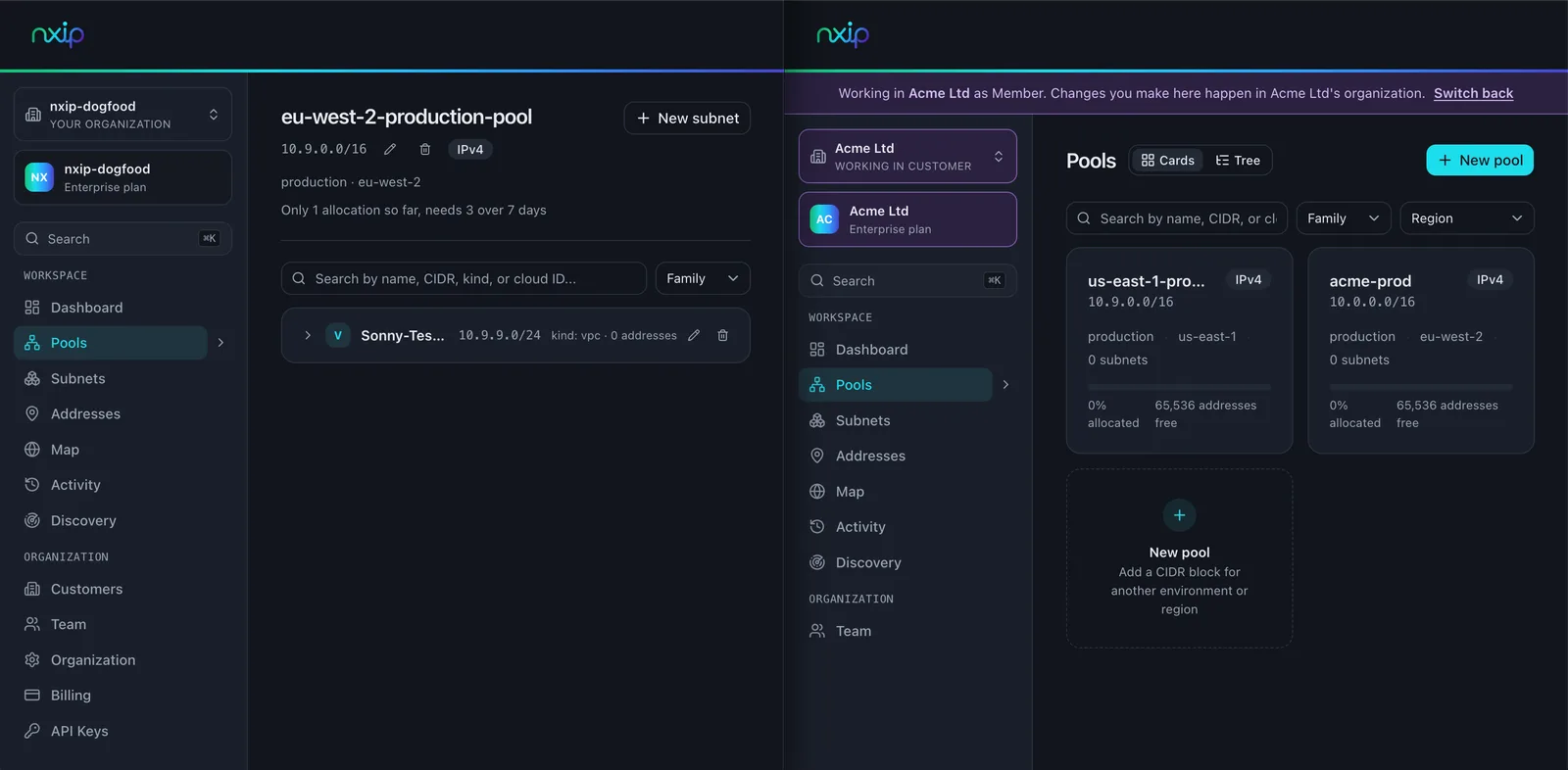
Two organizations holding the same space: 10.9.0.0/16 is a pool in each, and neither allocation check can see the other. One login, either estate.
Link the acquired estate as a customer organization of yours. One login, one API key, both estates, and nothing shared between them.
In the dashboard, a switcher appears at the top of the sidebar. Choose an estate and every page shows that estate's data, with a banner across the top naming the organization you are working in and the role you hold there. There is no mode where you are looking at both at once, which is the point: you always know which network you are about to change.
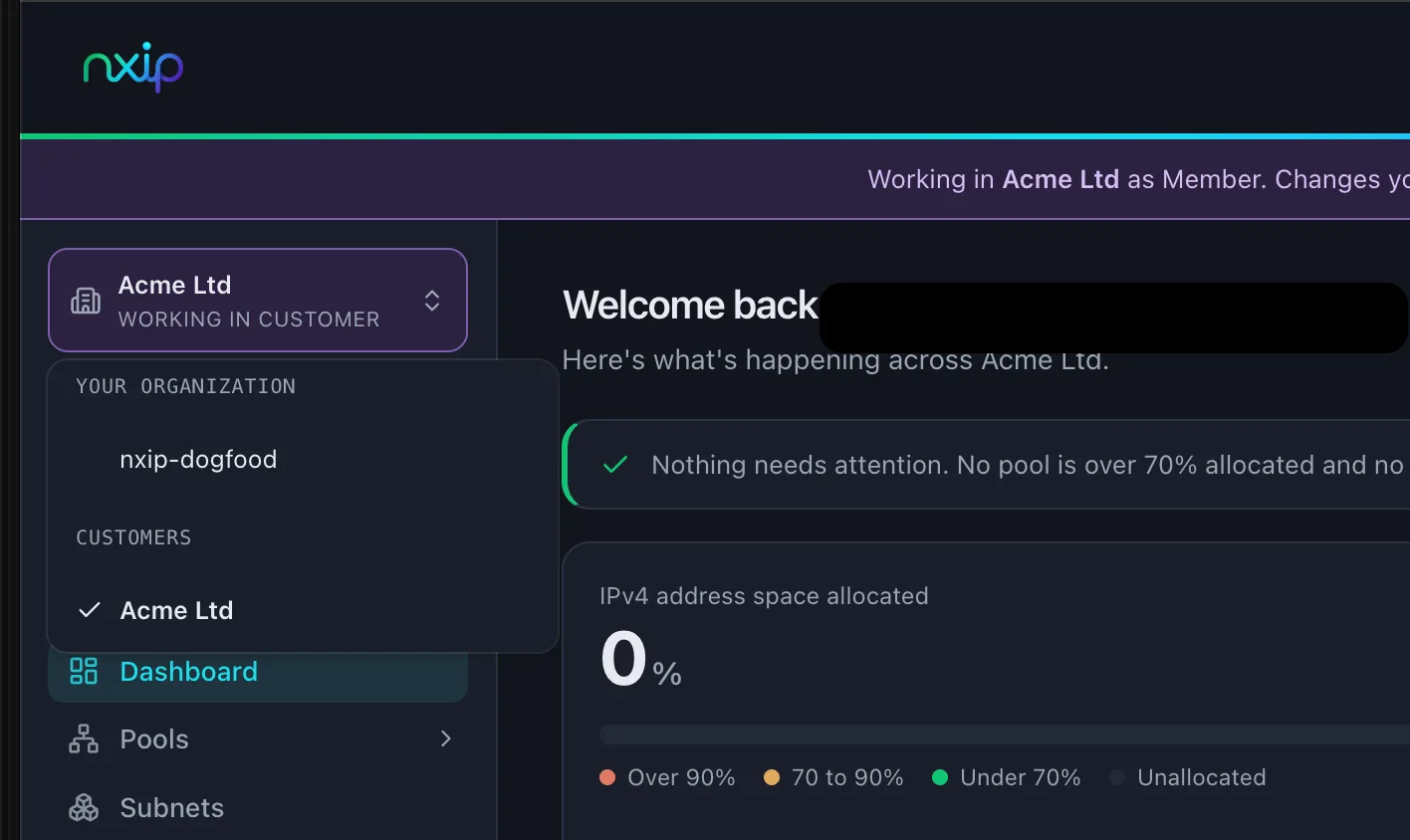
The switcher, with your own organization and the estates linked to it as the only two things you can be in. 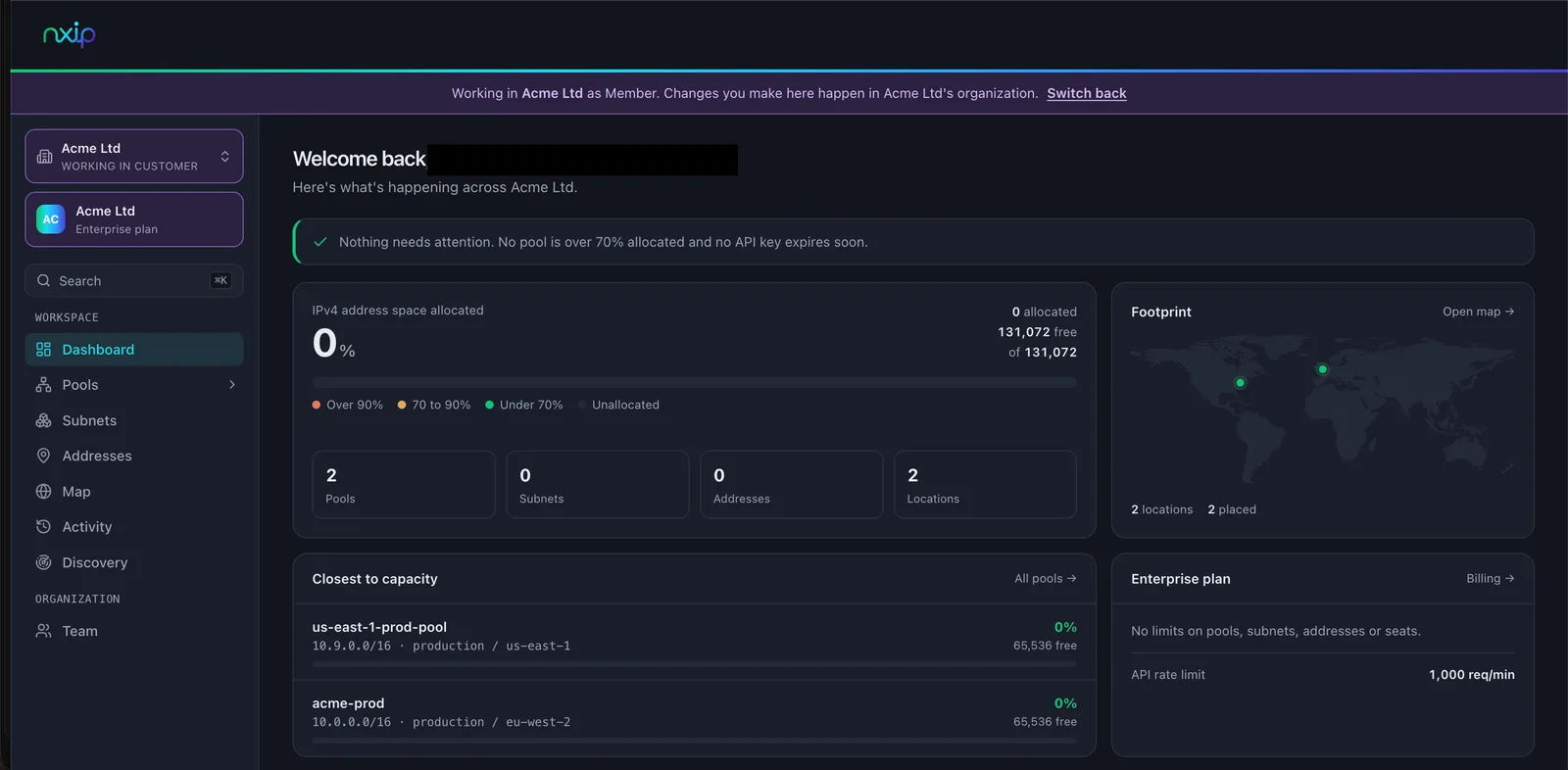
After switching, every page is that estate's, and the banner names the organization you are in and the role you hold there. In Terraform, the estate is named in the provider block, next to the resources it governs, rather than being implied by whichever credential the pipeline happened to pick up:
provider "nxip" {
  # your own estate: the organization your API key belongs to
}

provider "nxip" {
  alias        = "acquired"
  organization = var.acquired_organization_id
}

# a subnet in your own estate
resource "nxip_subnet" "hq_wifi" {
  environment   = "production"
  region        = "eu-west-2"
  family        = "IPV4"
  prefix_length = 24
  name          = "hq-wifi"
}

# the same resource type, in the acquired estate, in the same run
resource "nxip_subnet" "acquired_web" {
  provider      = nxip.acquired
  environment   = "production"
  region        = "eu-west-2"
  family        = "IPV4"
  prefix_length = 24
  name          = "web-tier"
}
Both blocks ask for a /24 in production eu-west-2, and they are answered from completely different address plans, because they are addressed to different organizations. Nothing in the acquired estate's space is visible to the first block, and nothing in yours is visible to the second.
The acquired team keeps a say.
Every link carries a role ceiling, and the ceiling is the acquired organization's grant rather than your own. Your effective role there is the lower of your own role and that ceiling. Their owner can set it to anything at any time, including read-only, and you can only ever lower it, never raise it. Either side can end the link, and it takes effect on the next request because the link is read from the database every time, never cached.
In the first weeks, read-only is a perfect medium to allow visibility without over-provisioning permissions.
Pointing at the wrong company is hard to do quietly.
The failure this whole arrangement exists to prevent is somebody running a change against the wrong estate and not noticing until afterwards. So every path says out loud which company it is about to touch.
Leaving organization unset in the provider means your own estate, exactly as before, so nothing changes for any configuration written before the deal. If your key does have customer organizations and you leave it unset, the provider raises a warning during plan saying so. A warning, never an error: it tells you the plan is about to manage your own space, and then lets the plan run.
Outside Terraform it is the same story.
planandapplytake--organization, andNXIP_ORGANIZATIONdoes the same job for a CI runner:npx nxip-cli plan -f acquired.yaml --organization <acquired-org-id>Both print their target as the first line of output, before anything else happens:
Target: customer organization <acquired-org-id>and when the flag is absent and your key does have customers, they print that instead, naming the flag. A script pointed at the wrong company says so in its own logs, at the top, before it does anything.
Every change is attributed within the organization.
A change made in the acquired organization is written into the acquired organization's audit log, carrying the API key, the person behind it where the credential belongs to a person. Trust, but verify.
That is not a nice-to-have during an integration, it is the answer to "who changed this" at the exact moment nobody can remember which of two teams owns the thing.
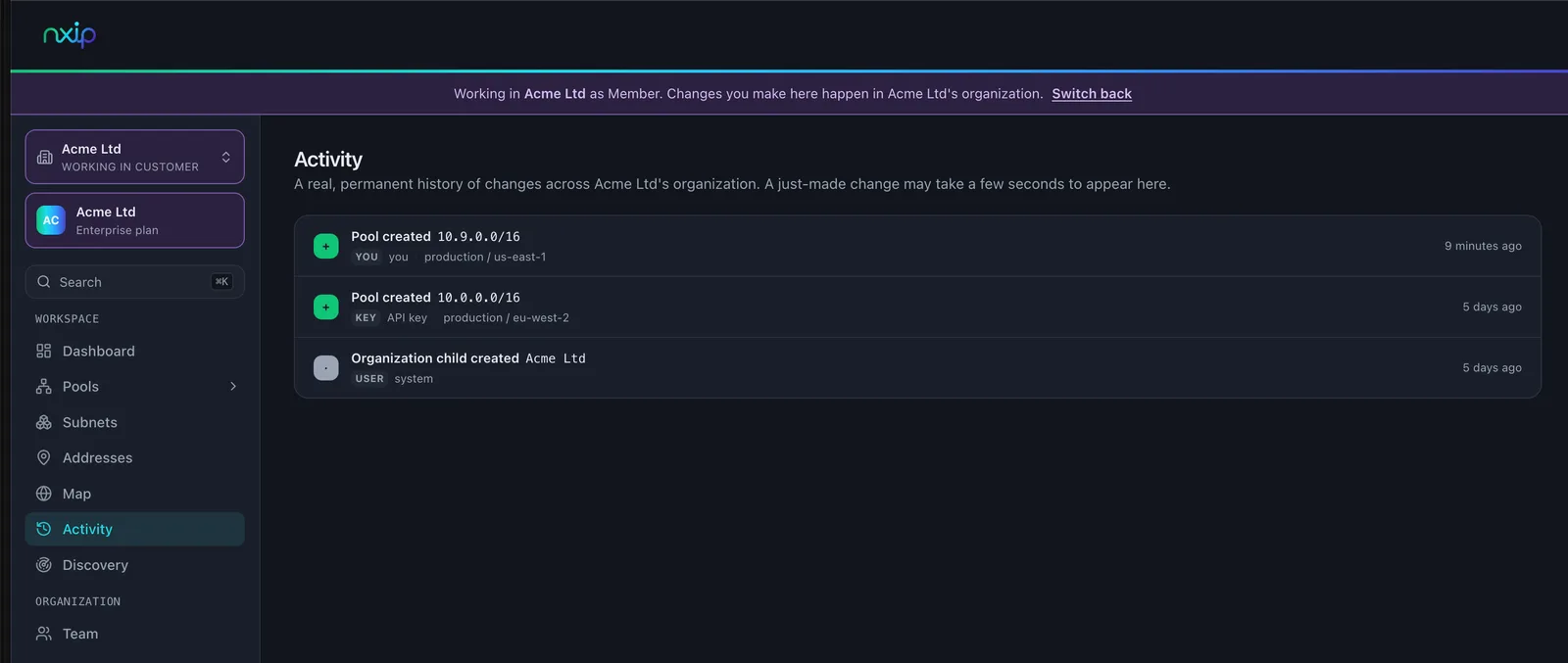
The acquired organization's own activity log, including a change the parent organization made, with the actor named against it. Get what exists in without anyone retyping it.
For a cloud estate, the read-only scan needs no nxip account and never contacts nxip at all:
npx nxip-cli scan aws azure --emit-manifest -o acquired.yamlIt reads what the credentials you give it can see, compares the discovered networks against each other on your machine, and writes a manifest of pools and subnets.
--fail-on-overlapmakes it exit non-zero when it finds a real conflict, which is the form you want it in inside a pipeline. Thenplanagainst the acquired organization to see what would be created without creating anything, andapplywhen you are happy. Re-running apply is safe: an entry that already exists is reported as existing, not duplicated.Discovery covers what the scan reads, which permissions it needs and what it does with what it finds. Getting your address space in walks the whole path from a scan or a spreadsheet through to records in nxip.
For anything already under Terraform,
terraform importworks on pools, subnets and addresses by record id, so the acquired estate's existing configuration can describe what is really there rather than being rewritten. Importing existing address space has the worked version.
What is still manual, and it is the part that matters
Be clear about where the work actually is, because none of the above touches it.
Comparing the two estates is no longer yours to do. Pick the two organizations on the Customers page and nxip reports where their address space collides, ranked by what would break if the networks were joined: two subnets both holding live addresses first, then one in use, then overlapping pools with no subnet collision, then identical blocks declared on both sides. It also says which side is cheaper to renumber, counted from what sits inside the overlapping block rather than the whole pool.
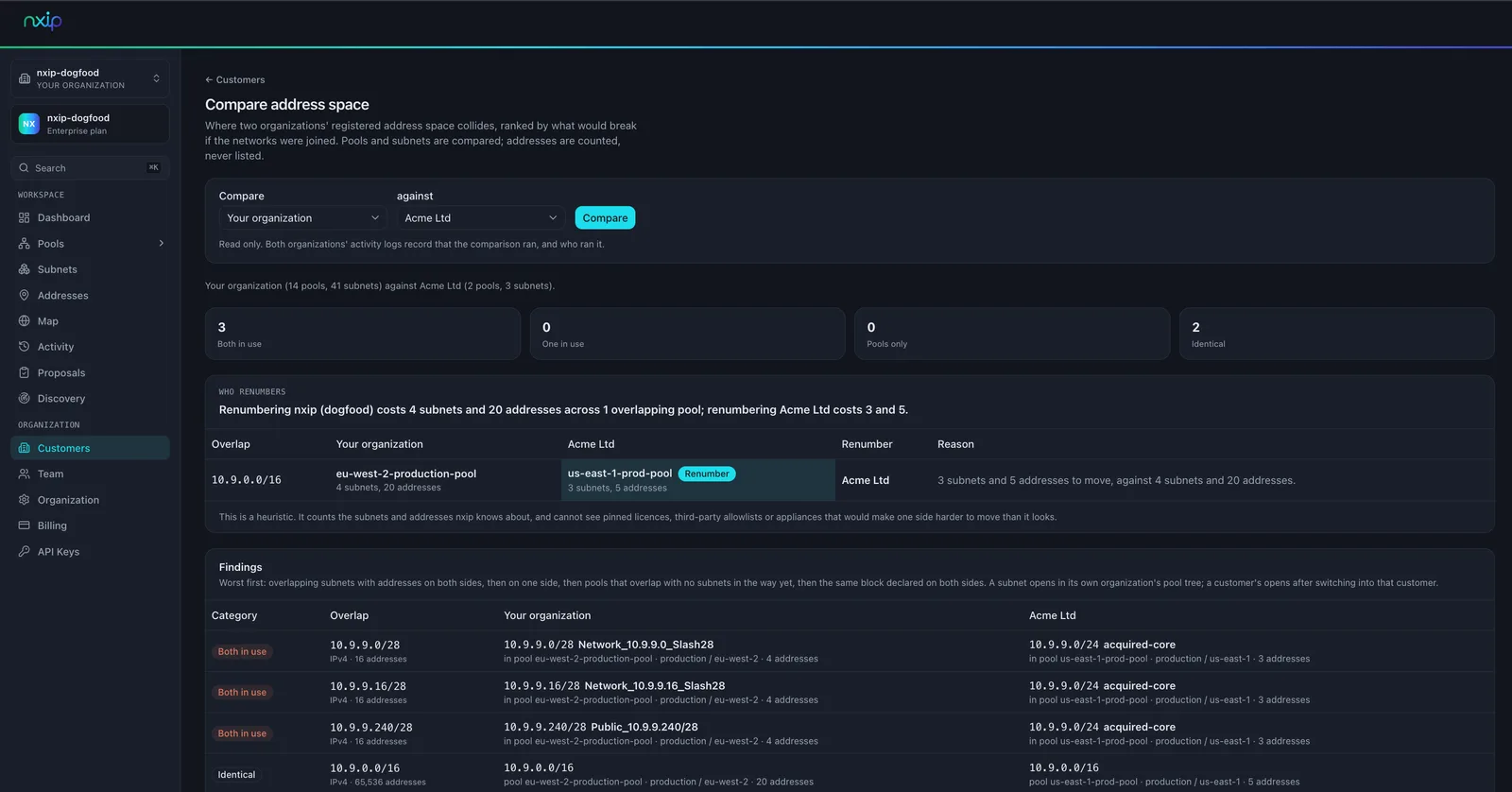
Nothing merges one estate into the other. Keeping them as two organizations is the design, not a staging area. There is no button that absorbs one into the other, and given what it would have to do to Terraform state, ids and audit history, you should be suspicious of one that claims to.
Deciding who renumbers is a human decision and always will be. The inputs are which side has fewer hard dependencies on its addresses, which side is smaller, which side has a change window, and which side has anything pinned: licences tied to an address, firewall rules at a third party, allowlists you do not control, appliances with addresses in config files nobody has opened in years. nxip counts subnets and addresses; it cannot see any of that, and it says so under the recommendation. A tool can hold the plan. It cannot make that call.
Doing the renumbering is real network work with a change window and a rollback plan. Nothing here shortens it.
The scan covers AWS and Azure. If the acquired estate is largely on premises, or in GCP, it comes in as a manifest you write, or through Terraform, and someone types it once.
Before the deal closes: what to establish
This part is useful whether or not you ever buy anything. These are the questions that turn "send us your IP addressing" into something a person can actually answer.
Ask for the address plan as a file, not a diagram. CSV, a spreadsheet, an export from whatever they use. A diagram tells you the intent. A file tells you the blocks.
If nobody can produce that file within a week, that is your finding. Write it down as a finding rather than chasing it. An estate whose address plan exists only in one person's head is a different integration from one whose plan is a file, and the difference belongs in the diligence report.
Ask which blocks are actually in use, which are reserved, and which are historical. The three are usually in the same document with nothing distinguishing them.
Get read-only cloud credentials, or ask them to run a read-only scan themselves and send you the output. A read-only scan is a small ask during diligence in a way that access to a console is not.
Compare the two sets of blocks for containment, not for equality. The collisions that hurt are a /24 sitting inside the other side's /16, and a string comparison of CIDRs will not find them.
List every place the two estates will have to talk: site-to-site VPN, cloud peering, transit gateway, SD-WAN, MPLS, a shared SaaS platform with an IP allowlist, anything with a direct connection to a third party. Every one of those is a place a collision becomes visible.
Ask what is not renumberable. Hard-coded addresses, licences pinned to an address, certificates, third-party allowlists, anything with a contract attached. This list is short and it decides which side moves.
Ask who owns the renumbering budget, before the deal closes rather than after. It is nobody's line item by default and it is not free. A data centre will be a different renumbering task than a small office.
The first month: what to do in what order
Freeze new allocations in the acquired estate until it has a recorded owner on your side. One person, named.
Put both estates under one authority as two organizations, and resist merging them. You want to see both and change neither by accident.
Record before you fix. The instinct is to start resolving collisions. The order that works is to get both plans recorded in the same place, then decide.
Hold the acquired estate read-only until you trust the record. Ask their owner to set the ceiling, rather than promising to be careful.
Know how good your record is, and where its blind spots are. What you loaded came from a cloud scan, from their Terraform state, or from a spreadsheet, and each one misses something different. A scan only covers the accounts and subscriptions you were given credentials for, so get the full list of them and check each one is represented. Their Terraform state only covers what they manage with Terraform. A spreadsheet is their documentation rather than their network, so sample it: pick a handful of ranges and confirm they are still in use and still that size. Write down what your record does not cover, because that is where the surprise comes from.
Run the comparison, then put a name against each row: which side renumbers, by when, and who signs the change. In writing, because this outlives the integration team.
Keep the audit trail from day one. The question "who changed this" gets asked most in exactly the period when the two organizations do not yet know each other's people.
If you are in the middle of one of these, I would like to hear which of the four failure modes above you actually hit, and how late.